
程序是怎样被链接和加载的
libc
- 尝试调试glibc
- 太复杂了
- musl-libc
✅ 代码简洁规范,模块化设计
✅ 支持动态/静态链接,调试符号完整
✅ 常用函数如malloc,strlen实现清晰
使用:gcc -static -nostdlib -I musl/include -L musl/lib链接 - dietlibc
✅ 极简设计(约 100KB)
✅ 适合嵌入式场景,POSIX 兼容
✅ 提供diet工具链简化编译
示例:diet gcc -o program program.c - pdclib (Public Domain C Library)
✅ 专为教学设计的微型实现
✅ 仅实现 ISO C 标准函数
✅ 代码注释详细,适合逐行分析
- 编译时添加
-g保留调试符号 - 使用
gdb单步跟踪函数调用 objdump -d反汇编观察指令级实现- 结合标准文档 (如 POSIX) 对照源码理解设计逻辑
- 不推荐glibc
- 不,你不想
- glibc 的代码有非常沉重的历史包袱
- 以及非常多的优化——都是对 “理解原理” 的阻碍
- 新手阅读体验极差
musl-gcc --verbose命令可以看到gcc到底是怎么配置的
sh
Using built-in specs.
Reading specs from /usr/lib/x86_64-linux-musl/musl-gcc.specs #可以打开这个
rename spec cpp_options to old_cpp_options
COLLECT_GCC=x86_64-linux-gnu-gcc
COLLECT_LTO_WRAPPER=/usr/libexec/gcc/x86_64-linux-gnu/13/lto-wrapper
OFFLOAD_TARGET_NAMES=nvptx-none:amdgcn-amdhsa
OFFLOAD_TARGET_DEFAULT=1
Target: x86_64-linux-gnu
Configured with: ../src/configure -v --with-pkgversion='Ubuntu 13.3.0-6ubuntu2~24.04' --with-bugurl=file:///usr/share/doc/gcc-13/README.Bugs --enable-languages=c,ada,c++,go,d,fortran,objc,obj-c++,m2 --prefix=/usr --with-gcc-major-version-only --program-suffix=-13 --program-prefix=x86_64-linux-gnu- --enable-shared --enable-linker-build-id --libexecdir=/usr/libexec --without-included-gettext --enable-threads=posix --libdir=/usr/lib --enable-nls --enable-bootstrap --enable-clocale=gnu --enable-libstdcxx-debug --enable-libstdcxx-time=yes --with-default-libstdcxx-abi=new --enable-libstdcxx-backtrace --enable-gnu-unique-object --disable-vtable-verify --enable-plugin --enable-default-pie --with-system-zlib --enable-libphobos-checking=release --with-target-system-zlib=auto --enable-objc-gc=auto --enable-multiarch --disable-werror --enable-cet --with-arch-32=i686 --with-abi=m64 --with-multilib-list=m32,m64,mx32 --enable-multilib --with-tune=generic --enable-offload-targets=nvptx-none=/build/gcc-13-fG75Ri/gcc-13-13.3.0/debian/tmp-nvptx/usr,amdgcn-amdhsa=/build/gcc-13-fG75Ri/gcc-13-13.3.0/debian/tmp-gcn/usr --enable-offload-defaulted --without-cuda-driver --enable-checking=release --build=x86_64-linux-gnu --host=x86_64-linux-gnu --target=x86_64-linux-gnu --with-build-config=bootstrap-lto-lean --enable-link-serialization=2
Thread model: posix
Supported LTO compression algorithms: zlib zstd
gcc version 13.3.0 (Ubuntu 13.3.0-6ubuntu2~24.04)
打开/usr/lib/x86_64-linux-musl/musl-gcc.specs
c
%rename cpp_options old_cpp_options

*cpp_options:
-nostdinc -isystem /usr/include/x86_64-linux-musl -isystem include%s %(old_cpp_options)
//这便是include头文件 位置
*cc1:
%(cc1_cpu) -nostdinc -isystem /usr/include/x86_64-linux-musl -isystem include%s

*link_libgcc:
-L/usr/lib/x86_64-linux-musl -L .%s

*libgcc:
libgcc.a%s %:if-exists(libgcc_eh.a%s)

*startfile:
%{shared:;static-pie:/usr/lib/x86_64-linux-musl/rcrt1.o; :/usr/lib/x86_64-linux-musl/Scrt1.o} /usr/lib/x86_64-linux-musl/crti.o crtbeginS.o%s
//这就是_start的地址,程序的入口
*endfile:
crtendS.o%s /usr/lib/x86_64-linux-musl/crtn.o

*link:
-dynamic-linker /lib/ld-musl-x86_64.so.1 -nostdlib %{shared:-shared} %{static:-static} %{static-pie:-static -pie --no-dynamic-linker} %{rdynamic:-export-dynamic}

*esp_link:


*esp_options:


*esp_cpp_options:- 接着gcc --verbose可以找到gcc的查找路径到底是什么:
#include "..." search starts here:
#include <...> search starts here:
/usr/lib/gcc/x86_64-linux-gnu/13/include
/usr/local/include
/usr/include/x86_64-linux-gnu
/usr/include
End of search list.- 如果使用musl-gcc可以找到对应的查找路径。查找对应的lib库
- env环境变量。程序reset之后env值应该为空,在init_libc的时候通过链接脚本引用赋值。
- end变量可以是任何类型,但是可以正确赋值。
动态内存管理
- 编程语言抽象不足
- malloc/free有类似的问题
- 赋值的时候都假设这个值不为空
- 因为非必要不实现原则
- use after free
- double free
- memory leak
- “最小完备性原则” 和 “机制策略分离” 的反面教材
- “每一个 malloc 在任何可能路径上都必有一次配对的 free,且之后不再使用”
- 在复杂系统里太难保证了
- java开发,Android,google。
- 诺基亚的cpp开发
- mmap(历史sbrk)
- 系统调用,获取大段内存
- 小段调用需要应用程序自己实现
- 空间碎片使用链表穿起来,空闲链表
- 使用二分搜索树Interval tree
- 可以按照顺序排序搜索
- 可以实现 O(logn)O(logn) 的分配/回收
- Dynamic Storage Allocation: A Survey and Critical Review
- Understanding real program behavior still remains the most important first step in formulating a theory of memory management. 现在的“科研实践”没有在解决真正的问题,你不知道实际的情况是如何行为的,你根本就不知道解决什么问题。
在实际系统中,我们通常不考虑 adversarial worst case
- 现实中的应用是 “正常” 的,不是 “恶意” 的
- 但这给了很多 Denial of Service 的机会:Cross container attack
malloc() 的观察
- 大对象分配后应,读写数量应当远大于它的大小
- 否则就是 performance bug
- 申请 16MB 内存,扫了一遍就释放了😂
- 这不是 bug,难道还是 feature 吗?
- 推论:越小的对象创建/分配越频繁,越大的对象生存周期更长一些
- 我们需要管理的对象
- Fast path (System I) ← AI 已经开始超越 System I 人类
- 性能极好、覆盖大部分情况
- 但有小概率会失败 (fall back to slow path)
- Slow path (System II) ← 人类也已经失守了
- 不在乎那么快
- 但把困难的事情做好
- 计算机系统里有很多这样的例子 (比如 cache)假设大多数情况都是很快处理的,只有小部分时候是高强度分析。
- 因为没有这么多能量保持一直做得很好,所以这就是一个高效的方法。
可执行文件
- 一个操作系统中的对象 (文件)
- 所以可以用open等操作系统的方式打开它。
- 特殊的是它可以被execve识别。
- 一个字节序列 (我们可以把它当字符串编辑)
- 一个描述了状态机初始状态的数据结构 (打扰了)
- https://www.gnu.org/software/binutils/
- 手册中有很多工具
- addr2line
- nm列出文件中的符号
- strings列出文件中可打印的字符串
- 读elf? Executable and Linkable Format
- elfcat工具
- elfcat /usr/bin/ls
- 可以得到一个html文件
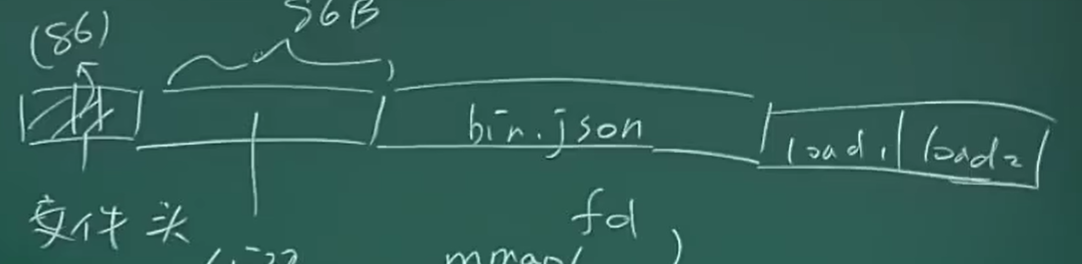
- 构建一个最小的elf可执行文件
- 一个文件头:(类似 7f 45 4c 46; 这是一个 jg 71)
- 头里面给出后面代码的大小,后面全部可以用json表示(数据结构)可能会浪费一些空间,但是可以让加载器变简单
- elf是一个没有任何问题的设计
- 主要是链接